This tutorial helps you learn the basics of using the platform in practice. For the main ideas behind the platform, see the About section.
Run your first shared connector
Let’s start with a small piece you can make your own. We’ll borrow a shared sequence of numbers, choose values from it, and save that choice as a new draft. By the end of the first four sections, you’ll have a draft you can test and a second version to compare with it. You don’t need to code or have used the platform before.
A connector holds rules for producing numbers and can use other connectors. A World is an application that gives those numbers a creative meaning: notes in a score, colours in a drawing, or moves in a game. We’ll work with the numbers first. Turning them into a complete piece in a World comes later.
Our shared connector is called pitch. It starts with a number and keeps adding 1. You can explore all the illustrations on this page without an account; they’re local examples and don’t save or publish anything. To try the real connector, choose your route below. You can switch routes above each exercise; your choice updates the whole tutorial.
Run four values in Studio
Studio is our visual editor. Open it in your browser; a larger screen gives its canvas more room. For this first exercise, just open the connector and run it. You don’t need an account, a wallet or transaction fees.
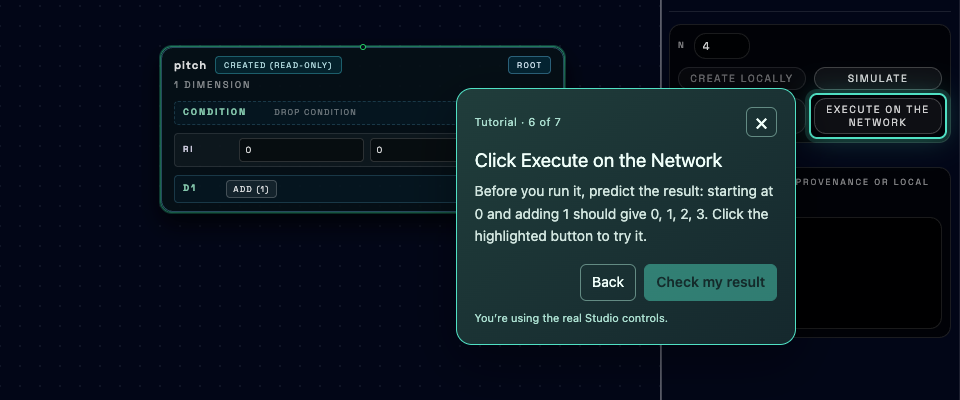
Prompts point to the controls as you run four values from pitch.
Run four values with your agent
Before you begin: you need an AI agent that supports MCP (Model Context Protocol), the connection that gives it platform tools.
Your agent can often handle the setup for you, if it can run commands and update its MCP settings. Point it to our MCP page and ask it to install and connect the server. You can use this prompt:
Read https://decentralised.art/mcp and follow its installation and connection instructions to install and register the decentralised.art MCP server for this agent. Set it up without a private key for now. Tell me if I need to restart the app or open a new session, then help me check that the decentralised.art tools are available.
If your agent can’t configure the connection itself, follow the MCP installation guide. After setup, restart the agent or open a new session if needed, then ask it to confirm that the decentralised.art tools are available. Reading and executing a published connector need no account.
Once the tools are connected, give your agent this prompt:
Read the decentralised.art primer and check that your platform tools are available. Inspect the published pitch connector and explain its rule in plain language. Execute four values with its default running settings: start 0, shift 0. Show the returned values, their paths and the execution block. I expect 0, 1, 2, 3. This is a read-only exercise; do not create or publish anything yet.
If the agent can’t find the tools, return to the installation guide and check the server registration before asking it to run anything.
Run four values with API calls
An API is a way to ask the platform to do something by sending a request. Try it here: choose Inspect pitch, then Run request. Its definition includes add with argument 1. Next, choose Run four values and run that request too.
This console sends only the public requests in this exercise. No account, wallet or transaction fee is needed. It shows the actual API response when you run a request.
Choose a command above, then run it to see the real API response.
Ready
Look for 0, 1, 2, 3 in particles, at path /pitch:0.
The response’s block_number and block_hash identify the blockchain snapshot
used for this run.
Run the same requests in your own terminal
Use Bash on macOS, Linux or Windows with WSL. Type bash to open that shell.
You’ll need curl version 7.76 or newer; check with curl --version.
Paste each block below, then press Enter. Keep this terminal open for the later exercises.
DCN_API="https://api.decentralised.art/chain"
curl --silent --show-error --fail-with-body "$DCN_API/connector/pitch"DCN_API="https://api.decentralised.art/chain"
curl --silent --show-error --fail-with-body "$DCN_API/execute" \
-H 'Content-Type: application/json' \
--data '{
"connector_name": "pitch",
"particles_count": 4,
"dynamic_ri": {
"0": {"start_point": 0, "transformation_shift": 0}
}
}'DCN_API stores the API’s address. The second command sends a JSON message: connector_name chooses pitch, particles_count asks for four
values, and dynamic_ri sets the run’s Start and Shift. Position "0" means the root connector you’re running. The --fail-with-body option reports an
unsuccessful request while keeping the API’s error message visible. See the execution API reference.
Run four values with the SDK
The SDK (software development kit) gives your code functions for calling the platform’s API. Choose JavaScript or Python below. This first script reads pitch and runs it; no account, wallet or transaction fee is needed.
1. Install. Use Node.js 18 or newer for JavaScript, or Python 3.9 or newer. Open a Bash terminal on macOS, Linux or Windows with WSL, in a new project folder, and run the installation command for your language. The Python commands also create and activate an environment for this project.
npm install "https://github.com/decentralised-art/sdk/releases/latest/download/decentralised-art-js-sdk.tgz" etherspython3 -m venv .tutorial-venv
source .tutorial-venv/bin/activate
python -m pip install "decentralised-art @ https://github.com/decentralised-art/sdk/releases/latest/download/decentralised-art-python-sdk.tar.gz"2. Save the script. Copy the code into first-run.mjs for
JavaScript or first-run.py for Python, in that same folder.
import { DecentralisedArtClient } from "decentralised-art";
const sdk = new DecentralisedArtClient({ baseUrl: "https://api.decentralised.art/chain" });
const connector = await sdk.connectorGet("pitch");
console.log(connector.dimensions);
const result = await sdk.execute("pitch", 4, {
"0": { start_point: 0, transformation_shift: 0 },
});
for (const stream of result.particles) console.log(stream.path, stream.data);
console.log("Execution block:", result.block_number);from decentralised_art import Client
with Client(base_url="https://api.decentralised.art/chain") as sdk:
connector = sdk.connector_get("pitch")
print(connector.dimensions)
result = sdk.execute("pitch", 4, {
"0": {"start_point": 0, "transformation_shift": 0},
})
for stream in result.particles:
print(stream.path, stream.data)
print("Execution block:", result.block_number)3. Run it. In the same terminal:
node first-run.mjspython first-run.pyLook for /pitch:0 with 0, 1, 2, 3, followed by the execution block
number. If the package can’t be found, check that you installed it in this folder and, for
Python, that the environment is still active.
Choose values from shared material
Your new connector can use another connector’s sequence and choose values from it. For example, it could choose the first, third, fifth and seventh values from pitch. Each position has a number called an index, counting from 0. Those positions are indexes 0, 2, 4 and 6. Choosing them doesn’t change the shared pitch connector.
A transformation is a rule that changes a number. For example, add with argument 2 adds 2 at each step. A dimension has its own sequence of transformations. Without a reference, its numbers are output values. When it references another connector, its numbers choose indexes in the referenced sequence: 0, 2, 4, 6 chooses every second position.
Try a different tab or selection below. The moving links show the choice travelling from your rule, through the shared sequence, to the World’s interpretation. Click any control to stop the animation and take a closer look; use Start to resume it.
Sculpt a shared palette
A connector chooses indexes. A shared palette provides values. A World gives them meaning.
Autoplay on
Choosing a tab, variation or index pauses the diagram. pitch is a published connector. Index and value match here because each palette starts at zero and adds one.
An index and its selected value can be different. When pitch starts at 0, index 2 selects value 2. When it starts at 60, index 2 selects value 62. The music illustration above selects indexes starting at 60 from a sequence starting at 0. In our draft below, we’ll reach the same values by starting the referenced sequence at 60 and selecting indexes from 0. The World receives the selected values, whichever route produced them.
Choose where a run begins
Let’s try one change in the real system before looking at the diagram.
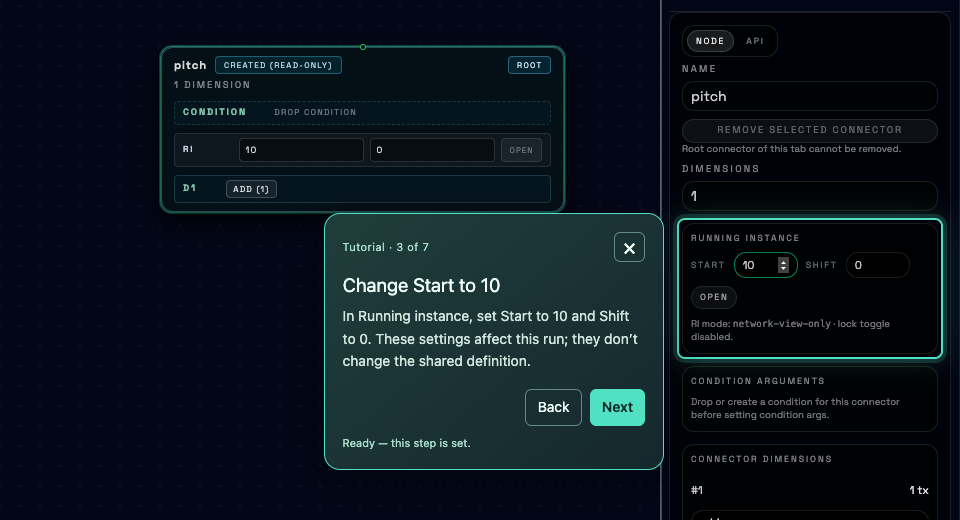
The guide shows where to change Start, then helps you check the result.
Using the published pitch connector, execute four values with Start 0 and Shift 0. Then change only the root running instance's Start to 10 and execute four values again. Show both requests and both returned sequences, and explain why the second should be 10, 11, 12, 13. This is a public read-only exercise: no signing account, draft creation or publication is needed.
Compare the results: 0, 1, 2, 3 becomes 10, 11, 12, 13. Only the starting point changed.
Change Start with an API call
Run Start at 10 below. Then choose Compare with Start 0 and run again. Look for 10, 11, 12, 13 in the first result and 0, 1, 2, 3 in the second. Only start_point changes; pitch still adds 1.
Choose a command above, then run it to see the real API response.
Ready
Run this in your own terminal
In the same Bash terminal, send the request with start_point set to 10:
DCN_API="https://api.decentralised.art/chain"
curl --silent --show-error --fail-with-body "$DCN_API/execute" \
-H 'Content-Type: application/json' \
--data '{
"connector_name": "pitch",
"particles_count": 4,
"dynamic_ri": {
"0": {"start_point": 10, "transformation_shift": 0}
}
}'Change Start in your code
Replace your first-run.mjs or first-run.py script with this version,
then run it again. It runs pitch twice, with Start 0 and then Start 10. Position "0" in the settings means the root connector you’re running.
import { DecentralisedArtClient } from "decentralised-art";
const sdk = new DecentralisedArtClient({ baseUrl: "https://api.decentralised.art/chain" });
for (const start of [0, 10]) {
const result = await sdk.execute("pitch", 4, {
"0": { start_point: start, transformation_shift: 0 },
});
console.log("Start:", start);
for (const stream of result.particles) console.log(stream.path, stream.data);
}from decentralised_art import Client
with Client(base_url="https://api.decentralised.art/chain") as sdk:
for start in [0, 10]:
result = sdk.execute("pitch", 4, {
"0": {"start_point": start, "transformation_shift": 0},
})
print("Start:", start)
for stream in result.particles:
print(stream.path, stream.data)node first-run.mjspython first-run.pyCompare 0, 1, 2, 3 with 10, 11, 12, 13. Only start_point changes; pitch still adds 1.
Same rule. A different place to begin.
The connector repeats +1, then +3. Choose its first value and where to enter that cycle.
Enter the cycle
Apply one operation per step, then repeat.
These settings are open: the person running the connector can choose them.
Follow this run
A running instance chooses the starting value and cycle entry at a position in the connector. Fixing that position saves both settings together; a run cannot override them. This is a local illustration.
An open running instance lets the person running the connector choose these settings. A static running instance fixes Start and Shift together for one position in the connector’s tree of references. A run cannot override that fixed pair. In the next exercise, we’ll fix the referenced pitch stream while leaving our new connector’s own settings open.
Make a draft and test your choice
Let’s save your own selection of 60, 62, 64, 66. Your new connector selects indexes 0, 2, 4, 6 from pitch, whose referenced stream starts at 60. The shared rule stays the same; your selecting rule is new.
add 2
Saving a draft requires a signing account to identify its creator. Create locally saves an unpublished definition on the platform server. Simulate tests it there. Neither spends a blockchain transaction fee (gas).
Build the relationship in Studio
The guide starts with a blank tab and points to each real control. Before saving, you’ll need the MetaMask browser extension and a wallet account. Sign in before building so the draft belongs to your account’s Studio session. No test ETH is needed.
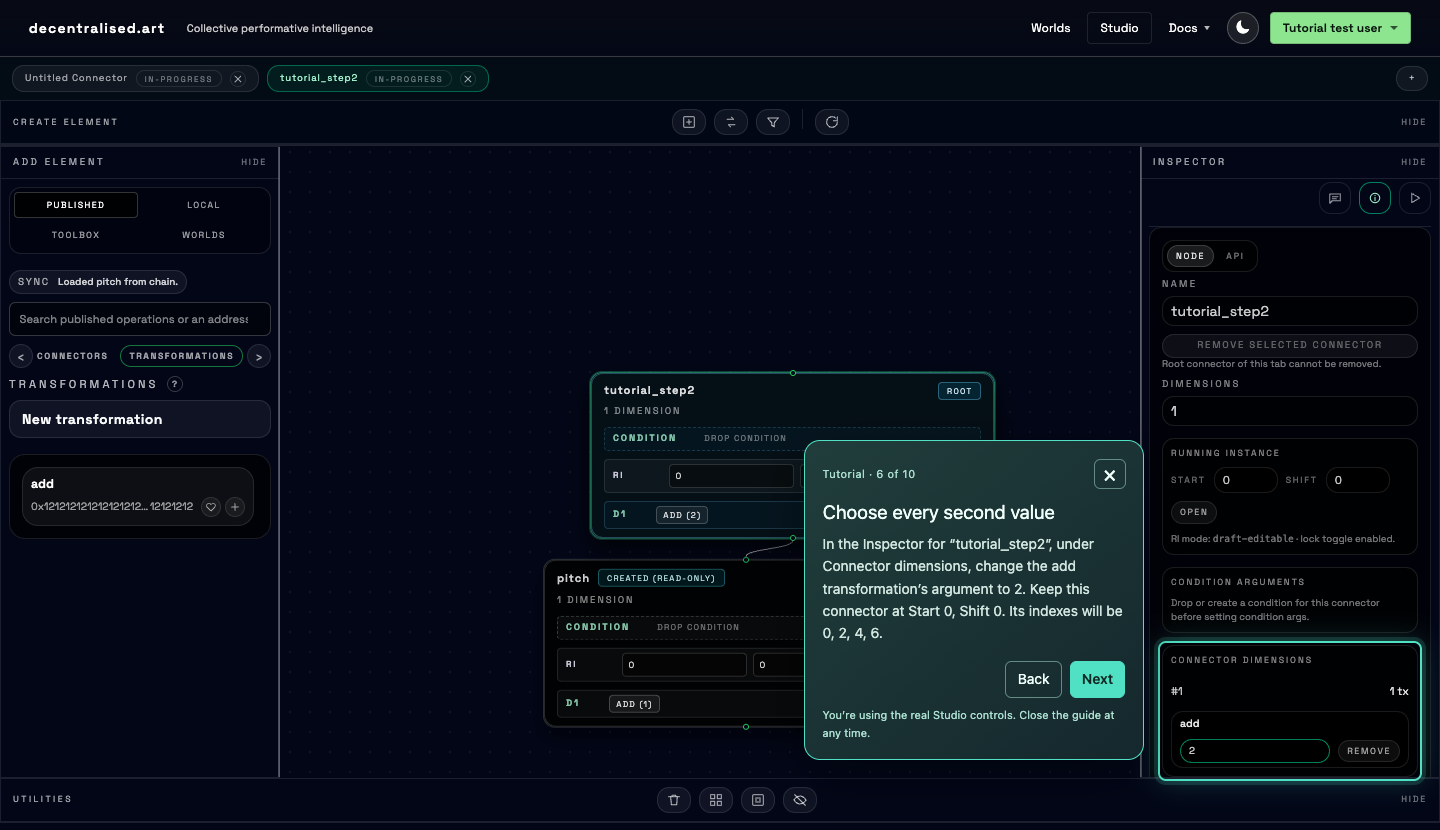
Connect pitch, choose your rule, then save and test a real draft.
Build the relationship with your agent
Configure the owner’s signing account locally using the MCP account configuration guide. Keep its key out of chat. Then give your agent this prompt:
Help me create a uniquely named draft connector with one dimension that references published pitch and uses published add with argument 2. Keep the new root and its selecting dimension at start 0, shift 0. In this new connector, store the referenced pitch stream’s fixed running instance at start 60, shift 0 (fixed running instance at position 2; root is position 0 and selecting dimension is position 1). Save the draft, then simulate four values. Indexes 0, 2, 4, 6 should select 60, 62, 64, 66. Show the draft name, values and output paths retaining the pitch reference. Explain any failure before retrying. Do not publish.
Build the relationship with API calls
This step uses your own terminal, where you can sign in with the draft’s owner account. Open a
terminal and type bash to begin.
Draft creation needs a Chain API access token: proof that you’ve signed in with
the account that will own the draft. Get one using the helper below, or follow the API authentication guide if you already
have a wallet-signing flow. Store the returned access_token in the Bash variable DCN_TOKEN. A services sign-in token won’t work here.
Get a Chain API token in the terminal
This helper uses the Python SDK to sign in; the exercise requests still use curl. You need Python 3.9 or newer and the private key of the test account you want to use. In your Bash terminal, install the helper’s package:
python3 -m venv .tutorial-venv
source .tutorial-venv/bin/activate
python -m pip install "decentralised-art @ https://github.com/decentralised-art/sdk/releases/latest/download/decentralised-art-python-sdk.tar.gz"Run the following block, then enter your test account’s private key at the hidden prompt. Enter it as the prompt’s answer, rather than pasting it into a command or chat. The key stays on your computer and signs a message; it isn’t sent to the API.
read -r -s -p 'Private key for your test account: ' DCN_OWNER_KEY
printf '\n'
export DCN_OWNER_KEYDCN_TOKEN="$(python - <<'PY'
import os
from eth_account import Account
from decentralised_art import Client
account = Account.from_key(os.environ["DCN_OWNER_KEY"])
with Client(base_url="https://api.decentralised.art/chain") as sdk:
sdk.login_with_account(account)
print(sdk.access_token)
PY
)"1. Create the draft. Run this in the same Bash terminal. It gives your draft a
new name, references pitch, and fixes the referenced stream at Start 60, Shift 0. In static_ri, position "2" is that referenced pitch stream: the root is 0 and
its selecting dimension is 1.
DCN_API="https://api.decentralised.art/chain"
DCN_DRAFT="tutorial_step2_$(date +%s)_$RANDOM"
curl --silent --show-error --fail-with-body "$DCN_API/connector" \
  -H "Authorization: Bearer ${DCN_TOKEN:?Sign in first}" \
  -H 'Content-Type: application/json' \
  --data @- <<JSON
{
  "name": "$DCN_DRAFT",
  "dimensions": [{
    "composite": "pitch",
    "transformations": [{"name": "add", "args": [2]}]
  }],
  "static_ri": {
    "2": {"start_point": 60, "transformation_shift": 0}
  }
}
JSON
Check that the response includes your new name and address: "0x0".
That address means the draft is saved but unpublished. If you get 401, sign in
again: the Chain API token lasts five minutes. Don’t continue to simulation until creation
succeeds.
2. Simulate it. This request needs no token:
curl --silent --show-error --fail-with-body "$DCN_API/simulate" \
  -H 'Content-Type: application/json' \
  --data @- <<JSON
{"connector_name":"$DCN_DRAFT","particles_count":4}
JSON
Simulation returns a list of streams, with path and data, rather than
the execution response’s particles wrapper and block information. When you’ve
finished with the account, run unset DCN_OWNER_KEY DCN_TOKEN.
Build the relationship in your code
This script signs in, creates a uniquely named draft and simulates it. Use the private key of the test account you want to own the draft. It signs a message locally; the key isn’t sent to the API. No test ETH is needed for this step.
1. Choose the account. In your project’s terminal, type bash to open
Bash, then run the block below. Enter the key at the hidden prompt as its answer, rather than pasting
it into a command or chat. For Python, keep your project environment active.
read -r -s -p 'Private key for your test account: ' DCN_OWNER_KEY
printf '\n'
export DCN_OWNER_KEY
2. Save the script. Create draft.mjs for JavaScript or draft.py for Python. Position "2" in static_ri fixes the referenced pitch stream; the root is 0 and its selecting dimension is 1.
import { randomUUID } from "node:crypto";
import { Wallet } from "ethers";
import { DecentralisedArtClient } from "decentralised-art";

const sdk = new DecentralisedArtClient({ baseUrl: "https://api.decentralised.art/chain" });
const wallet = new Wallet(process.env.DCN_OWNER_KEY);
await sdk.loginWithWallet(wallet);

const step = 2;
const name = "tutorial_" + randomUUID().replaceAll("-", "");
const draft = await sdk.connectorPost({
  name,
  dimensions: [{
    composite: "pitch",
    transformations: [{ name: "add", args: [step] }],
  }],
  static_ri: {
    "2": { start_point: 60, transformation_shift: 0 },
  },
});
console.log("Draft:", draft.name, "Address:", draft.address);

const streams = await sdk.simulate(name, 4);
for (const stream of streams) console.log(stream.path, stream.data);
import os
from uuid import uuid4
from eth_account import Account
from decentralised_art import Client
account = Account.from_key(os.environ["DCN_OWNER_KEY"])
with Client(base_url="https://api.decentralised.art/chain") as sdk:
sdk.login_with_account(account)
step = 2
name = "tutorial_" + uuid4().hex
draft = sdk.connector_post({
"name": name,
"dimensions": [{
"composite": "pitch",
"transformations": [{"name": "add", "args": [step]}],
}],
"static_ri": {
"2": {"start_point": 60, "transformation_shift": 0},
},
})
print("Draft:", draft.name, "Address:", draft.address)
for stream in sdk.simulate(name, 4):
print(stream.path, stream.data)3. Run it. The script prints the draft’s name, address and output:
node draft.mjspython draft.pyThe address should be 0x0: this is a saved, unpublished draft. Simulation returns
streams directly, without an execution block. If sign-in fails, check the account key and the
API’s error message before retrying. When you’ve finished with the account, run unset DCN_OWNER_KEY.
Check your draft: keep its saved name and look for 60, 62, 64, 66 in the simulation output, with a path retaining the pitch reference. It is saved and tested, but still unpublished.
If your draft doesn’t give those values
- 0, 2, 4, 6: the referenced pitch needs Start 60, Shift 0, set to static before saving.
- The gap is wrong: set add’s argument to 2 on your new root’s D1, rather than on shared pitch.
- Simulation won’t start: check that creation succeeded. Simulate the saved name; Execute on the Network needs publication.
- Sign-in expired or failed: unlock MetaMask and sign in again, or refresh your Chain API token. That token lasts five minutes.
- Pitch or add is missing: refresh the network library, or check the API’s error when reading its definition. Retry later if the service is unavailable.
- Name reserved: choose a new unique name. Saved definitions cannot be overwritten; correcting an already saved draft also needs a new name.
Try one change
What happens if your selector adds 12 instead of 2? Keep the referenced pitch at Start 60, Shift 0. Predict the four values, then make a second draft with a new name.
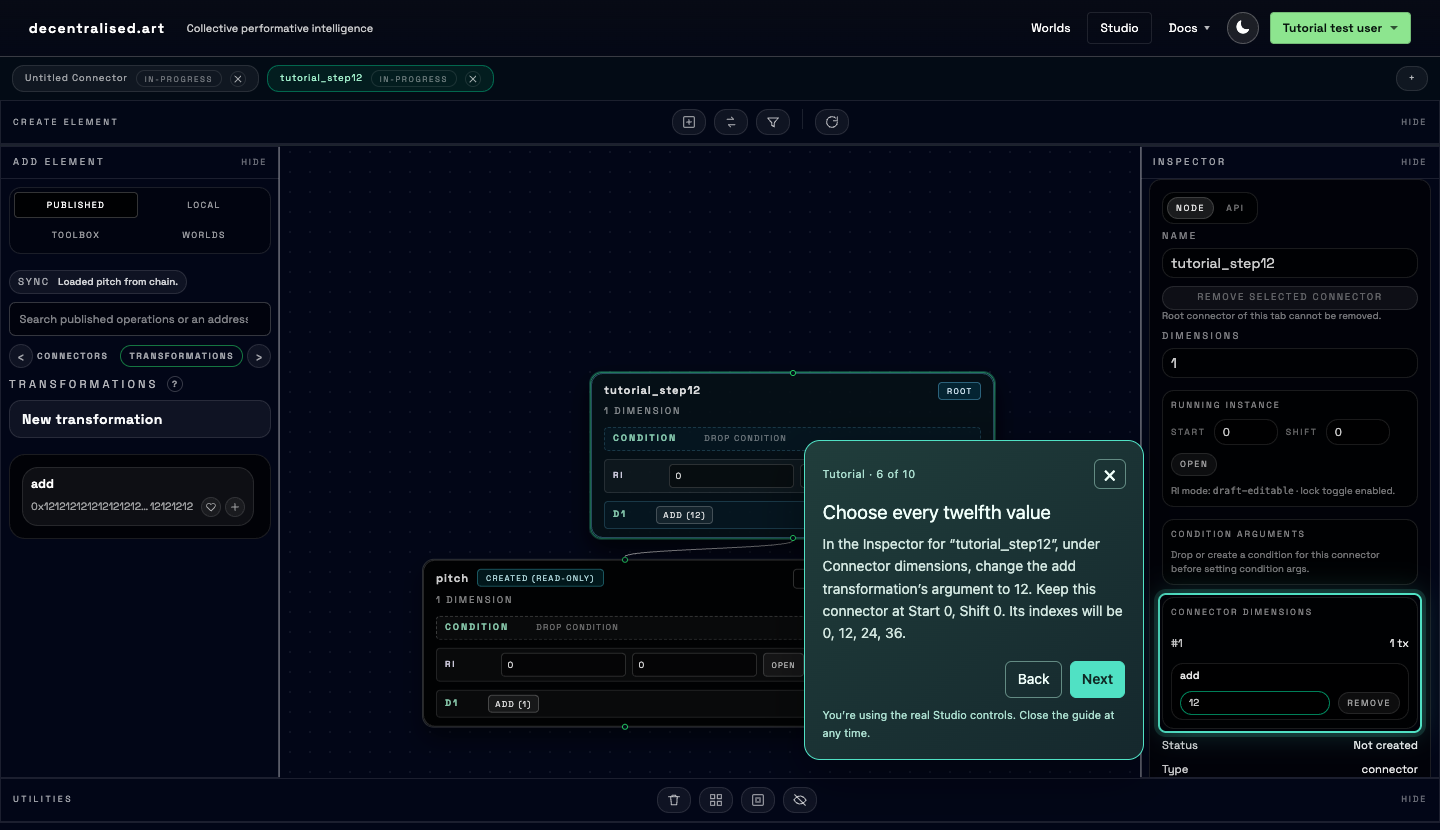
Make a new draft with add 12 and compare its four values.
Help me create a uniquely named draft connector with one dimension that references published pitch and uses published add with argument 12. Keep the new root and its selecting dimension at start 0, shift 0. In this new connector, store the referenced pitch stream’s fixed running instance at start 60, shift 0 (fixed running instance at position 2; root is position 0 and selecting dimension is position 1). Save the draft, then simulate four values. Indexes 0, 12, 24, 36 should select 60, 72, 84, 96. Use a different name from the first draft. Show the draft name, values and output paths retaining the pitch reference. Explain any failure before retrying. Do not publish.
In the creation command above, change "args": [2] to "args": [12].
Run creation again; it chooses a new name. Then run the simulation command for that name.
Sign in again first if the token has expired.
In draft.mjs or draft.py, change step = 2 to step = 12 and run it again. It signs in and chooses a new name each time. Enter the
key at the hidden prompt again if you already unset it.
Look for 60, 72, 84, 96. Your two selectors now choose different values from the same shared sequence. Keep both names so you can compare their output.
Give your values a place in a World
So far, our connector has had one dimension. You can give a connector several dimensions, each with its own rules and references. This is a multidimensional connector: one definition can supply several properties together. For example, a musical contribution could supply pitch, time, duration and velocity; a painting contribution could supply red, green and blue. The World interprets the values that the connector produces.
Earlier, we chose four values from one dimension. A connector can define several dimensions together and return their streams in one run. In these examples, the first value from each describes the first note or brush mark; the second values describe the next one.
Pitch alone tells us which note. Time, duration and velocity tell us when it starts, how long it lasts and how strongly it is played.
| Dimension | Note 1 | Note 2 | Note 3 | Note 4 |
|---|---|---|---|---|
| D1 · time | 0 | 1 | 2 | 3 |
| D2 · duration | 1 | 1 | 2 | 1 |
| D3 · pitch | 60 | 62 | 64 | 66 |
| D4 · velocity | 80 | 96 | 64 | 112 |
The pitch row starts with our earlier 60, 62, 64, 66 selection. Pick a note, then change just its duration. Its pitch stays the same; a different stream changes another property of that same note.
The connector’s creator defines its dimensions, rules and references. Here, the World reads values at the same position across the returned streams as one object. The score uses beats and MIDI pitch numbers; the painting uses RGB channels from 0 to 255 and fixes the marks’ positions and shapes. A World documents its units, ranges and grouping; it can also combine results from separate connectors when useful.
Each dimension can generate values directly or select them from another connector. Referencing pitch alone supplies only pitch; add dimensions for the other properties. These illustrations are local examples, not saved definitions or network runs. Try the two-dimensional exercise below to build the relationship in the real system.
Put two dimensions in one connector
Let’s keep our earlier pitch selection and add another dimension. In the new connector, D1 selects 60, 62, 64, 66 from pitch. D2 is a scalar dimension: it uses add with argument 1 to produce 0, 1, 2, 3 directly. You’ll save one draft and simulate both dimensions in one run. A World you build could read D2 as start times for the pitches in D1.
Build both dimensions in Studio
Stay signed in with the account you used to save your earlier draft. The guide starts a new connector, shows how to change Dimensions to 2, and checks both returned streams. Saving and simulation need no test ETH.
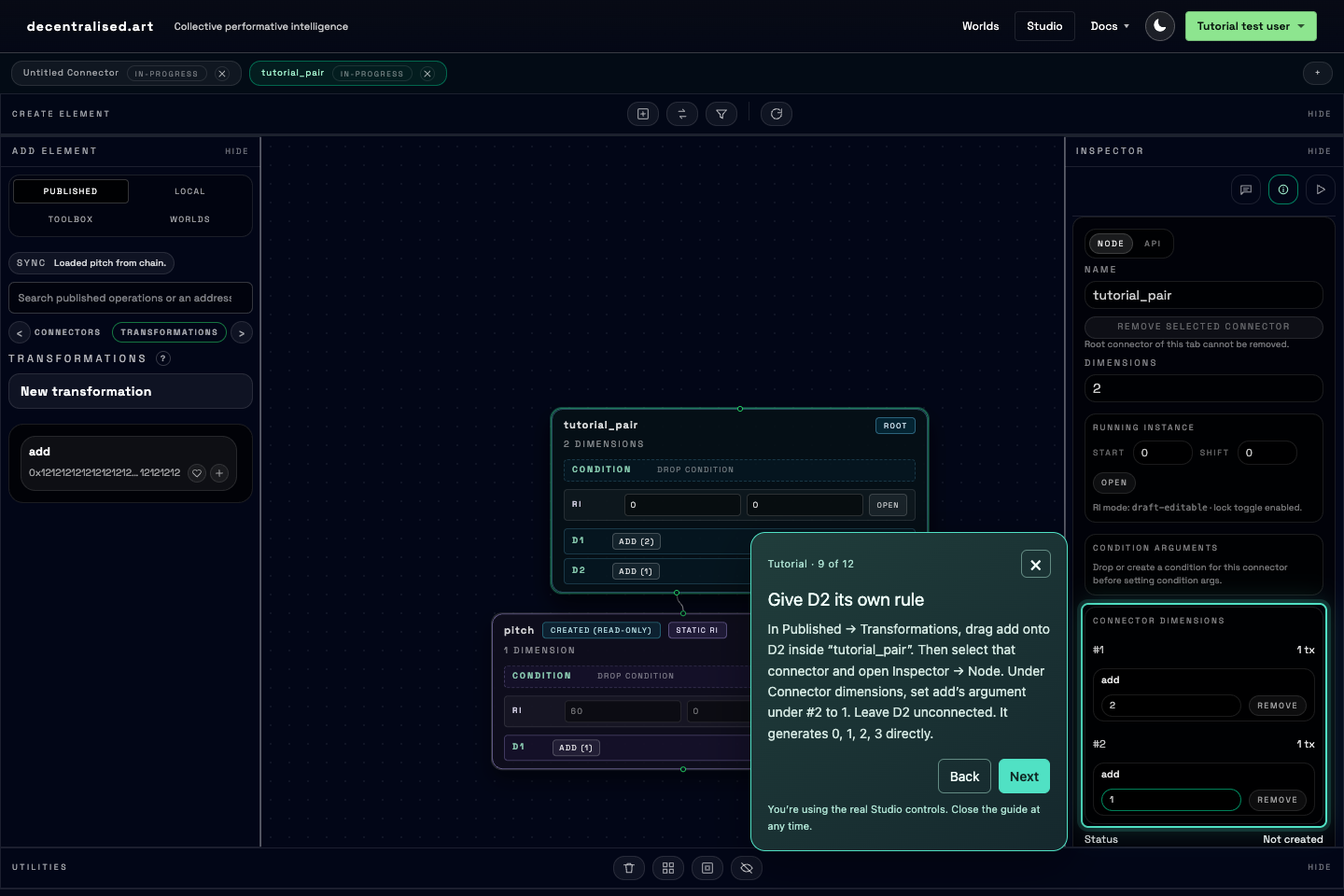
Keep your pitch selection, add a direct stream, then test both in one run.
Ask your agent to make a two-dimensional draft
Use the signing account configured for the earlier draft, then give your agent this prompt:
Use the decentralised.art tools to create a uniquely named local draft connector with two dimensions in this order: D1 references published pitch and uses published add with argument 2; D2 is a direct scalar with published add and argument 1, without a composite reference. Keep the root and dimensions at Start 0, Shift 0. Store the referenced pitch's static running instance at position 2, Start 60, Shift 0. Save one connector and simulate four values in one request. Show both output paths: /NAME:0/pitch:0 should contain 60, 62, 64, 66 and /NAME:1 should contain 0, 1, 2, 3. Replace NAME with the saved name. Explain how the two dimensions belong to one definition and how a World could interpret the second stream as times for the pitches in the first. This is not yet the MIDI World's complete format. Use my locally configured signing account for creation. Do not publish.
Create two dimensions with one API request
In the Bash terminal from the draft exercise,
refresh DCN_TOKEN with the sign-in helper if needed. The dimensions array below contains both dimensions of one connector. The second has no composite;
its rule produces values directly.
DCN_API="https://api.decentralised.art/chain"
DCN_DRAFT="tutorial_pair_$(date +%s)_$RANDOM"
curl --silent --show-error --fail-with-body "$DCN_API/connector" \
  -H "Authorization: Bearer ${DCN_TOKEN:?Sign in first}" \
  -H 'Content-Type: application/json' \
  --data @- <<JSON
{
  "name": "$DCN_DRAFT",
  "dimensions": [
    {"composite": "pitch", "transformations": [{"name": "add", "args": [2]}]},
    {"transformations": [{"name": "add", "args": [1]}]}
  ],
  "static_ri": {"2": {"start_point": 60, "transformation_shift": 0}}
}
JSON
After creation succeeds, simulate that saved name once:
curl --silent --show-error --fail-with-body "$DCN_API/simulate" \
  -H 'Content-Type: application/json' \
  --data @- <<JSON
{"connector_name":"$DCN_DRAFT","particles_count":4}
JSON
Create both dimensions in your code
Use your SDK project and the owner key from the draft exercise. If you cleared the key,
enter it again at that exercise’s hidden prompt. Save this as dimensions.mjs or dimensions.py, then run node dimensions.mjs or python dimensions.py. The two array entries are
saved in one definition; one simulation returns both streams.
import { randomUUID } from "node:crypto";
import { Wallet } from "ethers";
import { DecentralisedArtClient } from "decentralised-art";

const sdk = new DecentralisedArtClient({ baseUrl: "https://api.decentralised.art/chain" });
await sdk.loginWithWallet(new Wallet(process.env.DCN_OWNER_KEY));
const name = "tutorial_pair_" + randomUUID().replaceAll("-", "");

await sdk.connectorPost({
  name,
  dimensions: [
    { composite: "pitch", transformations: [{ name: "add", args: [2] }] },
    { transformations: [{ name: "add", args: [1] }] },
  ],
  static_ri: { "2": { start_point: 60, transformation_shift: 0 } },
});
console.log("Draft:", name);
for (const stream of await sdk.simulate(name, 4)) {
  console.log(stream.path, stream.data);
}
import os
from uuid import uuid4
from eth_account import Account
from decentralised_art import Client
with Client(base_url="https://api.decentralised.art/chain") as sdk:
sdk.login_with_account(Account.from_key(os.environ["DCN_OWNER_KEY"]))
name = "tutorial_pair_" + uuid4().hex
sdk.connector_post({
"name": name,
"dimensions": [
{"composite": "pitch", "transformations": [{"name": "add", "args": [2]}]},
{"transformations": [{"name": "add", "args": [1]}]},
],
"static_ri": {"2": {"start_point": 60, "transformation_shift": 0}},
})
print("Draft:", name)
for stream in sdk.simulate(name, 4):
print(stream.path, stream.data)Check both output paths: /your_name:0/pitch:0 contains 60, 62,
64, 66, and /your_name:1 contains 0, 1, 2, 3. Replace your_name with your draft’s name. Studio labels dimensions D1 and D2; output paths
count them from 0. Adding D2 leaves D1’s selection unchanged.
Why is the fixed running instance still at position 2?
The referenced pitch still uses fixed running instance "2": root 0, selecting
D1 at 1, pitch’s scalar dimension at 2. D2 comes after that branch, at position 3, and keeps
its default Start 0, Shift 0. These are positions in the reference tree, distinct from the
dimension numbers in the output paths.
Before contributing to a World, check its instructions: which properties it
reads, what the numbers mean, and how it groups them. Our two-dimensional draft demonstrates
how to combine properties; it is not yet a complete contribution for the MIDI World. That
World needs streams labelled pitch, time, duration and velocity. D2 here is a scalar of your
own connector, so its label is your_name:1, not time:0.
Inspect what your connector supplies
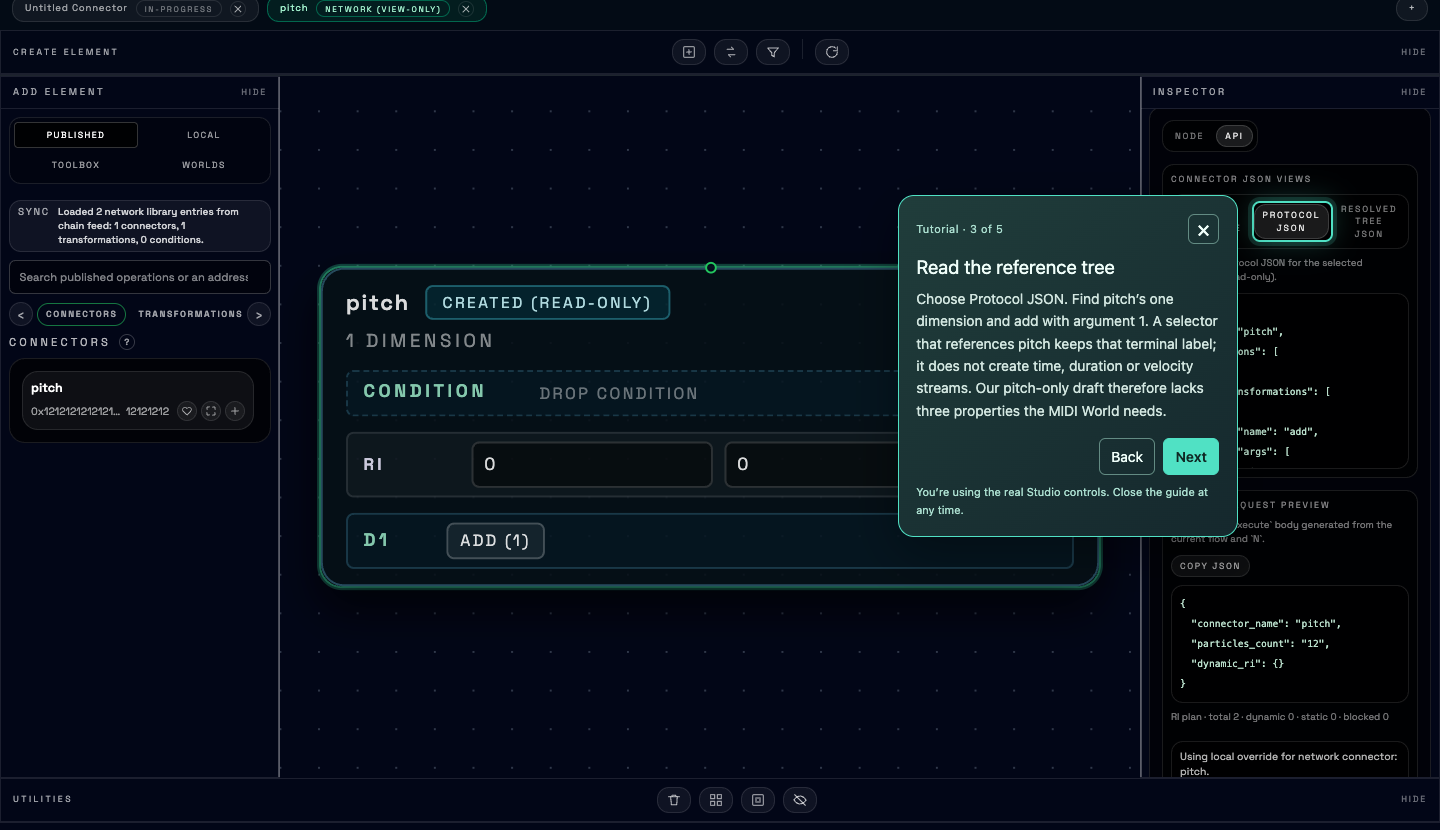
Inspect the real definition before choosing a World for it.
Want to see a complete contribution in action? Open the MIDI World.
- Choose an available name under Compatible Connectors and click Load connector in world (the arrow).
- Open Runtime settings, then click Render settings.
- Look for notes in the piano roll. Loading selects the contribution; rendering runs it. An empty feed means there is nothing to try yet.
Ask your agent to check compatibility
Inspect published pitch and its format information using the decentralised.art tools. Show its terminal scalar labels. Compare them with the MIDI Clip World’s requirements in the platform documentation: pitch, time, duration and velocity. Explain why our pitch-only selection is insufficient, and identify the missing streams before proposing changes. Do not create or publish anything.
Look for: pitch alone, with time, duration and velocity identified as missing. Ask the agent to explain a World’s units before it builds a new contribution.
Read the format with API calls
Run Inspect pitch and find format_hash. It identifies the stream
labels at the ends of the reference tree. List known formats lets you browse other
shapes of output.
Choose a command above, then run it to see the real API response.
Ready
Read pitch’s exact format in your terminal
In Bash, with Python 3 available to extract the hash:
DCN_API="https://api.decentralised.art/chain"
DCN_FORMAT="$(curl --silent --show-error --fail-with-body "$DCN_API/connector/pitch" | python3 -c 'import json,sys; print(json.load(sys.stdin)["format_hash"])')"
curl --silent --show-error --fail-with-body "$DCN_API/format/$DCN_FORMAT?limit=50"
Look for pitch:0 in scalars. A one-property format supplies no
time, duration or velocity streams.
Read the format in your code
Save this as format.mjs or format.py in your SDK project. Run node format.mjs or python format.py. No sign-in is needed.
import { DecentralisedArtClient } from "decentralised-art";
const sdk = new DecentralisedArtClient({ baseUrl: "https://api.decentralised.art/chain" });
const pitch = await sdk.connectorGet("pitch");
const format = await sdk.formatInfo(pitch.format_hash);
console.log("Scalar labels:", format.scalars);
console.log("Same format:", format.connectors);
from decentralised_art import Client
with Client(base_url="https://api.decentralised.art/chain") as sdk:
pitch = sdk.connector_get("pitch")
format_info = sdk.format_info(pitch.format_hash)
print("Scalar labels:", format_info.scalars)
print("Same format:", format_info.connectors)Look for: pitch:0 in the scalar labels. The other printed names share
that format; the list doesn’t tell you how a World interprets their values.
What a compatible format tells you
A scalar stream produces values directly instead of selecting from another connector. A format hash identifies the names and dimensions of the scalar streams at the ends of a connector’s reference tree. A World uses it to recognise a vocabulary.
The format doesn’t validate units, ranges or grouping. The World defines those conventions. Network values are unsigned whole numbers; negative or fractional quantities need an encoding.
A dimension can reference a multidimensional connector too. Its selecting indexes then choose positions across that connector’s output streams. A connector can therefore contain both direct scalar dimensions and references that supply several streams.
Publish when you’re ready to share
This step is optional. Publication gives your saved connector a permanent blockchain address so others can run and reference it. Review its rules and fixed settings first: the published definition cannot be edited.
You’ll need Sepolia test ETH in its owner’s account for gas. Sepolia is Ethereum’s test network. You don’t need mainnet ETH; a Sepolia faucet can supply test funds.
Create a draft
Signed in · no gas
Compose new operations and reuse existing ones.
Simulate
No transaction
Test the draft in the server’s local test environment.
Publish
Sepolia ETH for gas
Publish referenced operations first, then their parent.
Execute
Read only · no gas
Read published values; a compatible World gives them meaning.
Publish with your wallet
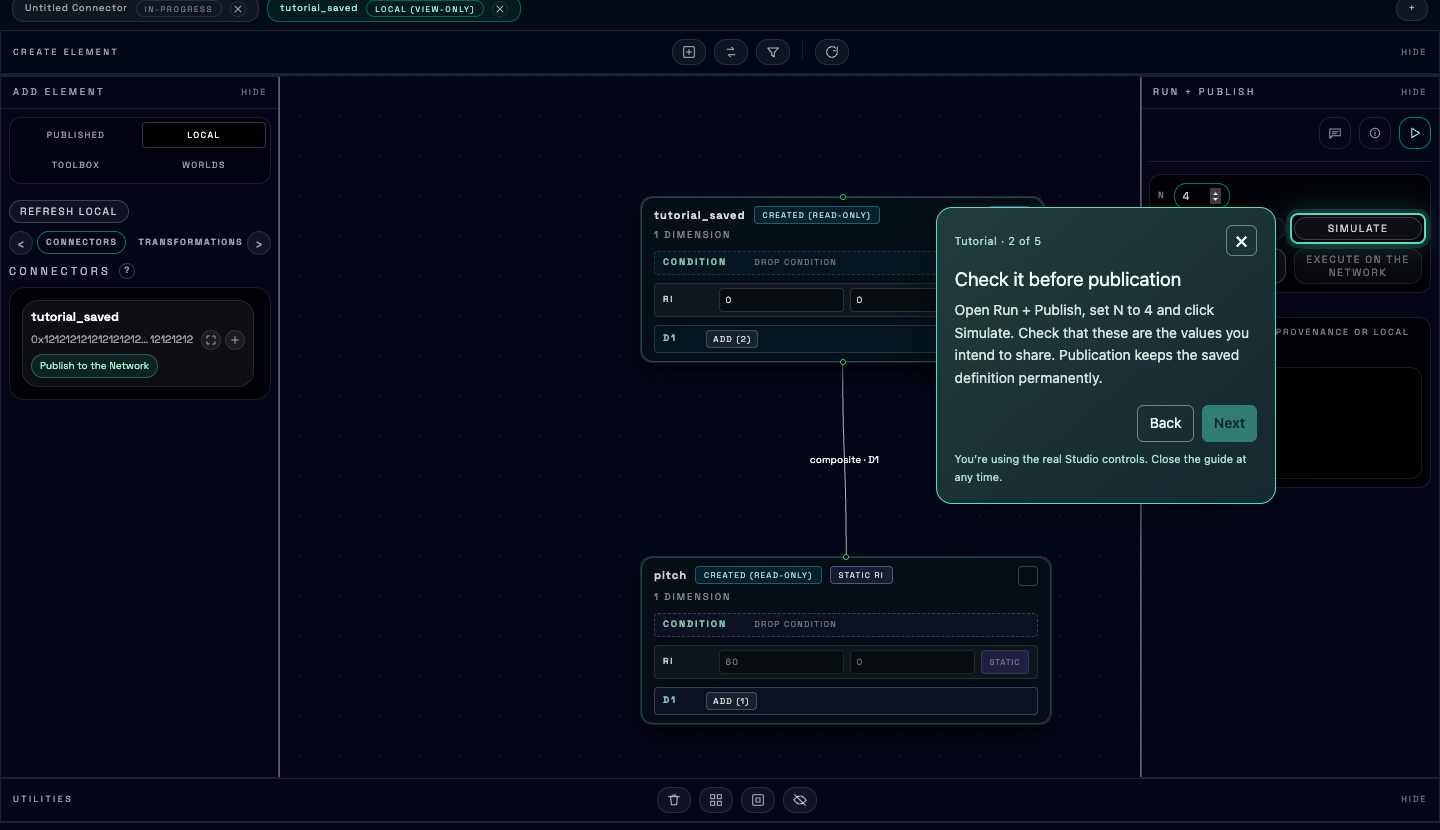
Review your draft, publish when you choose, then check a network run.
Finished means: a published address and a successful network read with the same four values. Keep the transaction hash and the execution block number and hash.
If publication or the next run is still pending
A pending transaction is not a failed publication. Confirm the same transaction again. If it is mined but execution cannot find your connector, wait for the API’s execution block to catch up, then retry the read. Discovery feeds can lag too. Do not publish a second time to fix this delay.
Review the publication with your agent
Give the agent your saved draft’s name. Use its locally configured owner account, funded with Sepolia test ETH.
Help me publish the tutorial draft whose name I give you. First read its saved definition, owner and dependencies, simulate four values and show me the result. Use Sepolia (chain ID 11155111) and propose a fee limit. Wait for my approval before signing or sending. Keep the transaction hash; if confirmation is interrupted, check that same transaction rather than sending again. After confirmation, execute four values when the execution block includes the publication. Show the values, block number, block hash and published address.
Finished means: a published address and a successful network read with the same four values. Keep the transaction hash and the execution block number and hash.
If publication or the next run is still pending
A pending transaction is not a failed publication. Confirm the same transaction again. If it is mined but execution cannot find your connector, wait for the API’s execution block to catch up, then retry the read. Discovery feeds can lag too. Do not publish a second time to fix this delay.
Prepare, sign, send, then check
Use the same Bash terminal and draft name. Sign in again with the owner if your Chain API token has expired. This request prepares a transaction; it does not send one.
curl --silent --show-error --fail-with-body "$DCN_API/publish/connector/prepare" \
  -H "Authorization: Bearer ${DCN_TOKEN:?Sign in first}" \
  -H 'Content-Type: application/json' \
  --output publication-prepared.json --data @- <<JSON
{"name":"$DCN_DRAFT","relay":true}
JSON
cat publication-prepared.json
Check status. prepared includes the transaction, content_hash and signing fields. published means this definition is already registered.
2. Sign, send and confirm in your terminal
Continue only after preparation succeeds with prepared. Run export DCN_DRAFT so the Python helper can check the name. Use the Python environment
and owner key from the earlier sign-in helper. Fund that owner with Sepolia test ETH.
Sign locally. Read publication-prepared.json first: check the owner,
destination, gas and fees. This helper refuses another chain, an expired preparation or a fee
price above 50 gwei. It signs without sending.
python - <<'PYTHON'
import json, os, time
from pathlib import Path
from eth_account import Account
from eth_utils import to_checksum_address

prepared = json.loads(Path("publication-prepared.json").read_text())
assert prepared["status"] == "prepared", "This definition is already published"
assert prepared["name"] == os.environ["DCN_DRAFT"], "Check the draft name"
assert prepared["deadline"] > time.time(), "Prepare again: deadline expired"
account = Account.from_key(os.environ["DCN_OWNER_KEY"])
tx, fees = prepared["transaction"], prepared["signing"]
assert account.address.lower() == tx["from"].lower(), "Use the draft owner"
assert int(tx["chainId"], 16) == 11155111, "Use Sepolia"
assert int(fees["maxFeePerGas"], 16) <= 50_000_000_000, "Fee exceeds 50 gwei ceiling"
signed = account.sign_transaction({
    "type": 2, "chainId": 11155111, "nonce": int(fees["nonce"], 16),
    "to": to_checksum_address(tx["to"]), "data": tx["data"], "gas": int(tx["gas"], 16),
    "maxFeePerGas": int(fees["maxFeePerGas"], 16),
    "maxPriorityFeePerGas": int(fees["maxPriorityFeePerGas"], 16), "value": 0,
})
Path("publication-send.json").write_text(json.dumps({
    "name": prepared["name"], "content_hash": prepared["content_hash"],
    "raw_tx": "0x" + bytes(signed.raw_transaction).hex(),
}))
print("Signed locally. Nothing sent yet.")
PYTHON
Send when ready. This command broadcasts the signed publication and spends
gas. Keep publication-sent.json and its tx_hash.
curl --silent --show-error --fail-with-body "$DCN_API/publish/connector/send" \
  -H "Authorization: Bearer ${DCN_TOKEN:?Sign in first}" \
  -H 'Content-Type: application/json' \
  --data @publication-send.json --output publication-sent.json
cat publication-sent.json
Confirm that transaction. A pending result needs another
confirmation with the same file; mined means publication completed. Refresh an expired
token without sending another transaction.
python3 - <<'PYTHON'
import json
from pathlib import Path
prepared = json.loads(Path("publication-prepared.json").read_text())
sent = json.loads(Path("publication-sent.json").read_text())
Path("publication-confirm.json").write_text(json.dumps({
    "name": prepared["name"], "content_hash": prepared["content_hash"],
    "tx_hash": sent["tx_hash"],
}))
PYTHON
curl --silent --show-error --fail-with-body "$DCN_API/publish/connector" \
  -H "Authorization: Bearer ${DCN_TOKEN:?Sign in first}" \
  -H 'Content-Type: application/json' \
  --data @publication-confirm.json
If sending fails or is interrupted, check the error and transaction status before sending
again. See the publication API reference for recovery. When finished, run unset DCN_OWNER_KEY DCN_TOKEN.
3. Read the published result
Once confirmation reports mined and the execution block has caught up, use this public
request. Compare its values with your simulation.
curl --silent --show-error --fail-with-body "$DCN_API/execute" \
  -H 'Content-Type: application/json' \
  --data @- <<JSON
{"connector_name":"$DCN_DRAFT","particles_count":4}
JSON
Finished means: a published address and a successful network read with the same four values. Keep the transaction hash and the execution block number and hash.
If publication or the next run is still pending
A pending transaction is not a failed publication. Confirm the same transaction again. If it is mined but execution cannot find your connector, wait for the API’s execution block to catch up, then retry the read. Discovery feeds can lag too. Do not publish a second time to fix this delay.
Publish your saved name from code
In Bash, set export DCN_DRAFT='your_saved_name'. Use the owner’s key at the
earlier hidden prompt and fund that account with Sepolia test ETH. Save the script as publish.mjs or publish.py, then run node publish.mjs or python publish.py when you choose to publish.
import { Wallet } from "ethers";
import { DecentralisedArtClient } from "decentralised-art";
const sdk = new DecentralisedArtClient({ baseUrl: "https://api.decentralised.art/chain" });
await sdk.loginWithWallet(new Wallet(process.env.DCN_OWNER_KEY));
const name = process.env.DCN_DRAFT;
if (!name) throw new Error("Set DCN_DRAFT to your saved name");
console.log(await sdk.publish("connector", name, {
  chainId: 11155111,
  maxFeePerGas: 50_000_000_000n,
}));
// Keep any transaction hash if confirmation is interrupted.
// Retry this read later if the execution block has not caught up.
console.log(await sdk.execute(name, 4));
import os
from eth_account import Account
from decentralised_art import Client
with Client(base_url="https://api.decentralised.art/chain") as sdk:
sdk.login_with_account(Account.from_key(os.environ["DCN_OWNER_KEY"]))
name = os.environ["DCN_DRAFT"]
print(sdk.publish("connector", name,
chain_id=11155111, max_fee_per_gas=50_000_000_000))
# Keep any transaction hash if confirmation is interrupted.
# Retry this read later if the execution block has not caught up.
print(sdk.execute(name, 4))The example refuses another chain or a fee price above 50 gwei. That is a ceiling for this example, not an estimate of your total fee. Its pitch and add dependencies are already published.
Finished means: a published address and a successful network read with the same four values. Keep the transaction hash and the execution block number and hash.
If publication or the next run is still pending
A pending transaction is not a failed publication. Confirm the same transaction again. If it is mined but execution cannot find your connector, wait for the API’s execution block to catch up, then retry the read. Discovery feeds can lag too. Do not publish a second time to fix this delay.
Publication preserves your definition. It doesn’t add the other streams a World may require.
If you want to build a World of your own
You decide what the numbers become. Let’s start with a small drawing prototype: each selected value sets a circle’s diameter in pixels. Your first draft gives similar sizes; your second spreads them further apart.
Use Studio to make the World’s material
Studio builds connectors; the World’s own interface involves code. Use your two draft outputs as a brief: one value should make one circle, and the value should be its diameter in pixels.
- Open each saved draft’s tab and Simulate with N 4.
- Compare the returned values with the circle preview above. Your add 12 selection should produce more visibly different sizes.
- Give those names and this interpretation to a developer or your agent. Switch to the SDK tab here to make a working local prototype.
Make a small prototype with your agent
Read https://decentralised.art/sdk#worlds and its World-hosting instructions. Help me make a local prototype using the tutorial draft name I supply. Simulate four values and draw four circles, interpreting each pitch value as a diameter in pixels (0–127). Show the actual returned numbers beside the circles. Once the prototype works, propose a hosted World bundle and manifest accepting the pitch scalar, using the World runtime and its current supported permissions. Do not upload or publish yet; do not put keys or tokens in the bundle.
Look for: four circles drawn from the actual simulation result. With your second draft, the diameters should be 60, 72, 84 and 96 pixels.
Turn an API result into a picture
In your Bash terminal, keep DCN_DRAFT set to a saved draft’s name. This public simulation
needs no token. Python 3 draws its returned values into a local HTML file.
curl --silent --show-error --fail-with-body "$DCN_API/simulate" \
  -H 'Content-Type: application/json' \
  --output streams.json --data @- <<JSON
{"connector_name":"$DCN_DRAFT","particles_count":4}
JSON
python3 - <<'PYTHON'
import json
from pathlib import Path
streams = json.loads(Path("streams.json").read_text())
values = next(s["data"] for s in streams if s["path"].endswith("/pitch:0"))
assert len(values) == 4 and all(isinstance(v, int) and 0 <= v <= 127 for v in values)
circles = "".join('<circle cx="' + str(55 + i * 110) + '" cy="70" r="' + str(v / 2) + '" fill="#b389ff"/>' for i, v in enumerate(values))
Path("my-world.html").write_text('<!doctype html><title>My circle prototype</title><p>Each value is a diameter in pixels.</p><svg viewBox="0 0 440 140">' + circles + '</svg>')
print("Open my-world.html in your browser. Diameters:", values)
PYTHON
Open my-world.html in a browser: you should see four circles. Repeat
with your other saved name to change the picture. This file is a local prototype; it has not been
uploaded as a hosted World.
Make a working local prototype
In Bash, set export DCN_DRAFT='your_saved_name'. Save this as world-preview.mjs or world-preview.py in your SDK project. It needs no signing key.
import { writeFileSync } from "node:fs";
import { DecentralisedArtClient } from "decentralised-art";
const sdk = new DecentralisedArtClient({ baseUrl: "https://api.decentralised.art/chain" });
const name = process.env.DCN_DRAFT;
if (!name) throw new Error("Set DCN_DRAFT to your saved draft name");
const streams = await sdk.simulate(name, 4);
const values = streams.find(s => s.path.endsWith("/pitch:0"))?.data;
if (!values || values.length !== 4 || values.some(v => !Number.isInteger(v) || v < 0 || v > 127)) {
  throw new Error("Expected four pitch values between 0 and 127");
}
const circles = values.map((v, i) => '<circle cx="' + (55 + i * 110) + '" cy="70" r="' + (v / 2) + '" fill="#b389ff"/>').join("");
writeFileSync("my-world.html", '<!doctype html><title>My circle prototype</title><p>Each value is a diameter in pixels.</p><svg viewBox="0 0 440 140">' + circles + '</svg>');
console.log("Open my-world.html in your browser. Diameters:", values);
import os
from pathlib import Path
from decentralised_art import Client
with Client(base_url="https://api.decentralised.art/chain") as sdk:
streams = sdk.simulate(os.environ["DCN_DRAFT"], 4)
values = next(s.data for s in streams if s.path.endswith("/pitch:0"))
assert len(values) == 4 and all(isinstance(v, int) and 0 <= v <= 127 for v in values)
circles = "".join('<circle cx="' + str(55 + i * 110) + '" cy="70" r="' + str(v / 2) + '" fill="#b389ff"/>' for i, v in enumerate(values))
Path("my-world.html").write_text('<!doctype html><title>My circle prototype</title><p>Each value is a diameter in pixels.</p><svg viewBox="0 0 440 140">' + circles + '</svg>')
print("Open my-world.html in your browser. Diameters:", values)node world-preview.mjspython world-preview.pyOpen my-world.html in a browser: it should contain four circles whose
diameters match the simulated values. Run it with your other draft’s name and compare.
Turn the prototype into a hosted World
Move the drawing logic into a page that subscribes to the World runtime’s onState and reads state.payload.executeOutput. Add a manifest naming the pitch scalar
and the required permissions, then package and validate the bundle using Building a World. Use Upload a World when the bundle is ready.
Choose where your editor will run
A World can include an editor for drawing, composing or arranging movements. A standalone app with the full SDK can create, simulate, publish and execute operations with the appropriate signing setup. A hosted World currently has a smaller set of supported calls. Try the two options below.
- Create drafts Available
- Simulate Available
- Publish Available
- Execute Available
What changes when you upload a World?
An uploaded World runs in a sandbox: an isolated environment connected through a controlled host bridge. Its runtime SDK supports discovery, reads, simulation and execution. It does not currently expose draft creation or publication. Including the full SDK in the bundle does not bypass that boundary; a publishing editor needs an extended bridge and a trusted signing flow.
Package the interface, interpretation code and manifest using the World-hosting guide. Users can make contributions in Studio or with an agent while the hosted World reads them.
Leave room for the next person: offer a shared source for each property, and explain its units and ranges. That is the palette approach we practised here: a way to design reusable connectors, rather than a separate platform object.
When should a connector be allowed to run?
A condition is a rule that answers yes or no before a connector produces its values. It can be financial, such as requiring a recorded cryptocurrency payment, or non-financial, such as checking whether an algorithmic requirement is met. The connector’s creator chooses the rule and attaches it to their connector.
For a financial example, imagine that public address A must pay public address B before a connector can run. A custom payment contract could forward that payment and keep a receipt. The condition would read that receipt when someone requests a run. Sending the payment and checking it are two separate actions.
Imagine a maker asks for a payment before their connector can be used. A custom payment contract sends the cryptocurrency from address A to address B and records a receipt.
You send the payment separately; the condition checks that it was received.
Request a run
Someone asks for the connector’s output.
Check the condition
paid == true
Read and evaluate. No payment or other state change.
Reject execution
This request does not return output.
Preview: the check fails, so this request is rejected.
This illustration changes only this page. It sends no payments or network requests.
Try two published conditions on the same selection you used earlier: every second pitch value, beginning at 60. Each pair changes only the condition’s fixed arguments. You can run these examples without signing in.
See a real condition in Studio
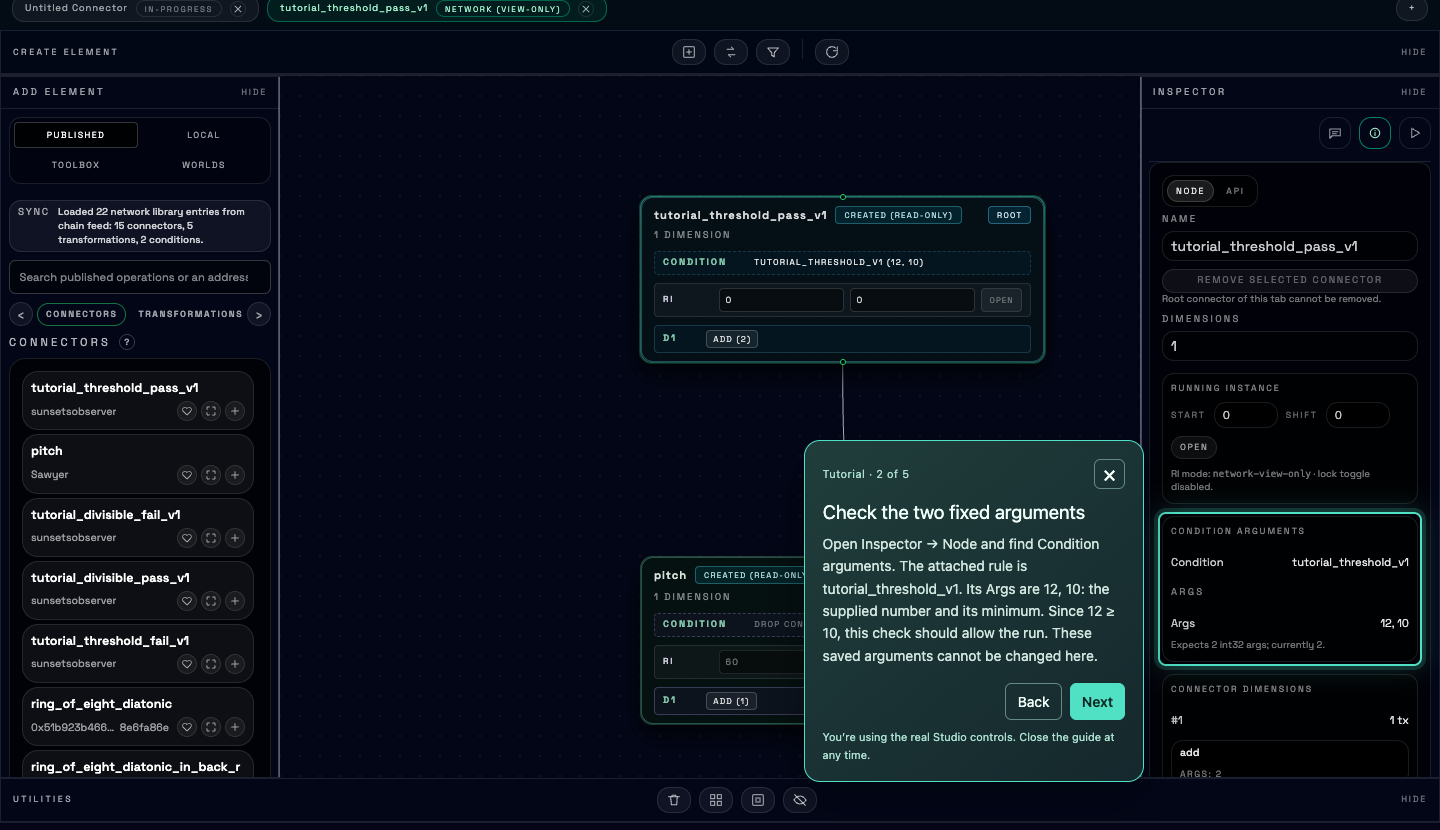
Inspect the threshold’s fixed arguments, predict its answer, then run four values.
Threshold
Is the supplied number at least the minimum?
Open 12 ≥ 10 · allowed ↗ Open 8 < 10 · blocked ↗Divisibility
Does the supplied number divide by 3 without a remainder?
Open 12 ÷ 3 = 4 · allowed ↗ Open 14 ÷ 3 has a remainder · blocked ↗In either example, select the root connector and open Inspector → Node to see Condition arguments. In Run + Publish, set N to 4 and click Execute on the Network. The saved arguments stay fixed when you run it.
Look for: 60, 62, 64, 66 when 12 meets the minimum of 10, or when 12
divides by 3 exactly. With 8 below 10, or 14 not divisible by 3, the condition should reject the
whole run. Its response says Execution rejected: Condition not met. An
unavailable server or missing connector is a different problem.
See the rules and inspect their published definitions
The creator supplied these Solidity function bodies for the two examples:
return args[0] >= args[1];if (args[1] <= 0) return false;
return args[0] % args[1] == 0;Both take two signed integer arguments. The divisibility rule rejects zero or negative divisors.
Their published definitions report args_count: 2 and an on-chain address. Inspection
does not return Solidity source; keep source with your own creations.
DCN_API="https://api.decentralised.art/chain"
curl --silent --show-error --fail-with-body \
  --write-out '\nHTTP %{http_code}\n' \
  "$DCN_API/condition/tutorial_threshold_v1"
curl --silent --show-error --fail-with-body \
  --write-out '\nHTTP %{http_code}\n' \
  "$DCN_API/condition/tutorial_divisible_v1"
Try two published conditions on the same selection you used earlier: every second pitch value, beginning at 60. Each pair changes only the condition’s fixed arguments. You can run these examples without signing in.
Ask your agent to compare both outcomes
Read the published conditions tutorial_threshold_v1 and tutorial_divisible_v1, then inspect these four published connectors: tutorial_threshold_pass_v1, tutorial_threshold_fail_v1, tutorial_divisible_pass_v1, tutorial_divisible_fail_v1. Explain each connector’s fixed condition arguments. Execute four values from each using public reads; no sign-in or wallet is needed. Both passing examples should return the pitch stream 60,62,64,66 and an execution block. The threshold compares [12,10] versus [8,10]; divisibility compares [12,3] versus [14,3]. Show actual results and error bodies. Verify that a blocked run failed because its condition was not met, rather than a missing connector, network problem or other error. Do not create, publish or send a transaction.
Look for: 60, 62, 64, 66 when 12 meets the minimum of 10, or when 12
divides by 3 exactly. With 8 below 10, or 14 not divisible by 3, the condition should reject the
whole run. Its response says Execution rejected: Condition not met. An
unavailable server or missing connector is a different problem.
See the rules and inspect their published definitions
The creator supplied these Solidity function bodies for the two examples:
return args[0] >= args[1];if (args[1] <= 0) return false;
return args[0] % args[1] == 0;Both take two signed integer arguments. The divisibility rule rejects zero or negative divisors.
Their published definitions report args_count: 2 and an on-chain address. Inspection
does not return Solidity source; keep source with your own creations.
DCN_API="https://api.decentralised.art/chain"
curl --silent --show-error --fail-with-body \
  --write-out '\nHTTP %{http_code}\n' \
  "$DCN_API/condition/tutorial_threshold_v1"
curl --silent --show-error --fail-with-body \
  --write-out '\nHTTP %{http_code}\n' \
  "$DCN_API/condition/tutorial_divisible_v1"
Try two published conditions on the same selection you used earlier: every second pitch value, beginning at 60. Each pair changes only the condition’s fixed arguments. You can run these examples without signing in.
Try the allowed and blocked requests here
Choose a threshold or divisibility request, then click Run request. These are public reads of the actual published connectors; they create no transaction and need no token.
Choose a command above, then run it to see the real API response.
Ready
Run the same comparisons in your terminal
# 12 meets the minimum of 10: expect four pitch values
curl --silent --show-error --fail-with-body \
  --write-out '\nHTTP %{http_code}\n' \
  "https://api.decentralised.art/chain/execute" \
  -H 'Content-Type: application/json' \
  --data '{"connector_name":"tutorial_threshold_pass_v1","particles_count":4}'

# 8 is below 10: expect a condition refusal
curl --silent --show-error --fail-with-body \
  --write-out '\nHTTP %{http_code}\n' \
  "https://api.decentralised.art/chain/execute" \
  -H 'Content-Type: application/json' \
--data '{"connector_name":"tutorial_threshold_fail_v1","particles_count":4}'# 12 is divisible by 3: expect four pitch values
curl --silent --show-error --fail-with-body \
--write-out '\nHTTP %{http_code}\n' \
"https://api.decentralised.art/chain/execute" \
-H 'Content-Type: application/json' \
--data '{"connector_name":"tutorial_divisible_pass_v1","particles_count":4}'
# 14 is not divisible by 3: expect a condition refusal
curl --silent --show-error --fail-with-body \
--write-out '\nHTTP %{http_code}\n' \
"https://api.decentralised.art/chain/execute" \
-H 'Content-Type: application/json' \
--data '{"connector_name":"tutorial_divisible_fail_v1","particles_count":4}'The blocked requests intentionally return a non-success HTTP status, so curl reports an error. Read the response body to check that the condition caused the refusal.
Look for: 60, 62, 64, 66 when 12 meets the minimum of 10, or when 12
divides by 3 exactly. With 8 below 10, or 14 not divisible by 3, the condition should reject the
whole run. Its response says Execution rejected: Condition not met. An
unavailable server or missing connector is a different problem.
See the rules and inspect their published definitions
The creator supplied these Solidity function bodies for the two examples:
return args[0] >= args[1];if (args[1] <= 0) return false;
return args[0] % args[1] == 0;Both take two signed integer arguments. The divisibility rule rejects zero or negative divisors.
Their published definitions report args_count: 2 and an on-chain address. Inspection
does not return Solidity source; keep source with your own creations.
DCN_API="https://api.decentralised.art/chain"
curl --silent --show-error --fail-with-body \
  --write-out '\nHTTP %{http_code}\n' \
  "$DCN_API/condition/tutorial_threshold_v1"
curl --silent --show-error --fail-with-body \
  --write-out '\nHTTP %{http_code}\n' \
  "$DCN_API/condition/tutorial_divisible_v1"
Try two published conditions on the same selection you used earlier: every second pitch value, beginning at 60. Each pair changes only the condition’s fixed arguments. You can run these examples without signing in.
Compare the published examples in your code
Save this in your SDK project as condition-examples.mjs or condition-examples.py. Run node condition-examples.mjs or python condition-examples.py. No owner key or login is needed.
import { DecentralisedArtClient, DecentralisedArtApiError } from "decentralised-art";

const sdk = new DecentralisedArtClient({ baseUrl: "https://api.decentralised.art/chain" });
const examples = [
  ["tutorial_threshold_pass_v1", true],
  ["tutorial_threshold_fail_v1", false],
  ["tutorial_divisible_pass_v1", true],
  ["tutorial_divisible_fail_v1", false],
];
const expected = [60, 62, 64, 66];

for (const [name, allowed] of examples) {
  const definition = await sdk.connectorGet(name);
  console.log(name, definition.condition_name, definition.condition_args);
  try {
    const result = await sdk.execute(name, 4);
    if (!allowed) throw new Error(name + " unexpectedly returned values.");
    const pitch = result.particles.find((s) => s.path.endsWith("/pitch:0"));
    if (JSON.stringify(pitch?.data) !== JSON.stringify(expected)) {
      throw new Error(name + " returned unexpected pitch values.");
    }
    console.log("Pitch:", pitch.data);
    console.log("Block:", result.block_number, result.block_hash);
  } catch (error) {
    if (!(error instanceof DecentralisedArtApiError) || allowed) throw error;
    console.log("Request rejected; inspect the reason:", error.status, error.body);
  }
}
from decentralised_art import Client
from decentralised_art.client import DecentralisedArtApiError
examples = [
("tutorial_threshold_pass_v1", True),
("tutorial_threshold_fail_v1", False),
("tutorial_divisible_pass_v1", True),
("tutorial_divisible_fail_v1", False),
]
expected = [60, 62, 64, 66]
with Client(base_url="https://api.decentralised.art/chain") as sdk:
for name, allowed in examples:
definition = sdk.connector_get(name)
print(name, definition.condition_name, definition.condition_args)
try:
result = sdk.execute(name, 4)
if not allowed:
raise RuntimeError(name + " unexpectedly returned values.")
pitch = next((s for s in result.particles if s.path.endswith("/pitch:0")), None)
if pitch is None or pitch.data != expected:
raise RuntimeError(name + " returned unexpected pitch values.")
print("Pitch:", pitch.data)
print("Block:", result.block_number, result.block_hash)
except DecentralisedArtApiError as error:
if allowed:
raise
print("Request rejected; inspect the reason:", error.status_code, error.body)The script prints each connector’s fixed arguments and checks the passing values. For blocked requests it prints the API’s actual error; read its reason before treating it as a successful condition test.
Look for: 60, 62, 64, 66 when 12 meets the minimum of 10, or when 12
divides by 3 exactly. With 8 below 10, or 14 not divisible by 3, the condition should reject the
whole run. Its response says Execution rejected: Condition not met. An
unavailable server or missing connector is a different problem.
See the rules and inspect their published definitions
The creator supplied these Solidity function bodies for the two examples:
return args[0] >= args[1];if (args[1] <= 0) return false;
return args[0] % args[1] == 0;Both take two signed integer arguments. The divisibility rule rejects zero or negative divisors.
Their published definitions report args_count: 2 and an on-chain address. Inspection
does not return Solidity source; keep source with your own creations.
DCN_API="https://api.decentralised.art/chain"
curl --silent --show-error --fail-with-body \
  --write-out '\nHTTP %{http_code}\n' \
  "$DCN_API/condition/tutorial_threshold_v1"
curl --silent --show-error --fail-with-body \
  --write-out '\nHTTP %{http_code}\n' \
  "$DCN_API/condition/tutorial_divisible_v1"
Try making the algorithmic check yourself next. We’ll write return args[0] >= args[1];, attach it with [12, 10], and test a
connector. A second draft with [8, 10] should be rejected.
What happens when the connector runs?
The runner checks the connector and each connector it references. If a required condition returns false, the whole request fails. If they all pass, the runner evaluates the transformations and returns the requested values. A condition permits a requested run; passing it does not start a run automatically.
A condition receives the arguments stored in the connector’s definition. It is not automatically given the generated numbers or the reader’s wallet address. Our payment example checks a specified A-to-B payment; once it is recorded, that check passes for anyone requesting that connector. Personal access rules need a design that identifies the participant explicitly.
A payment condition needs evidence it can read on chain. A recipient’s balance alone does not prove which address paid it. The payment contract, receipt format and condition must be developed together; this illustration is a possible design. Simulation uses a local Ethereum Virtual Machine whose balances and external contracts can differ from Sepolia. Test a published state-dependent condition at the execution block you intend to use.
Bring information from outside the blockchain
Makers could also develop transactions with blockchain oracles: services that bring external data onto the blockchain. A transaction would store a weather reading, an environmental measurement or a result from a public API. Custom transformations and conditions could then read that data as part of their evaluation.
A World could change its colours with the air quality, or allow an operation only when a recorded temperature reaches a threshold. This requires a suitable oracle integration; Solidity does not fetch an API directly during a run. The maker must decide which source to trust and how fresh its data must be. Learn more about how Ethereum oracles work.
Create your own transformations and conditions
Start by looking for a rule you can reuse. As more transformations, conditions and connectors using them are published, you can build more by combining what is already there. You only need new code when the available elements don’t express your idea.
You can always add a custom rule in Solidity, the language used for these smart contracts. A transformation takes a number and returns another number. A condition takes its fixed arguments and returns true or false. Studio, an agent, the API and the SDK all create the same kinds of elements.
Let’s create a repeating selection and the algorithmic check above. The selection will cycle
through indexes 0, 1, 2, 3, 0, 1. Referencing pitch from 60 will give 60, 61, 62, 63, 60, 61. We’ll save and simulate drafts first, without publishing.
Try a loop that chooses the first four values of pitch, then starts again. Add a
threshold condition: it allows the run when the supplied value is at least 10. These are two
reusable elements; the connector chooses their arguments and how to combine them.
The two Solidity snippets used in this exercise
The platform accepts a function body in sol_src and builds the contract
around it. Paste the body, without a full contract, imports or Markdown fences.
return (x + 1) % 4;x is the current unsigned 32-bit value. The remainder operator % makes 3 lead back to 0. Starting at 0, the selection indexes are 0, 1, 2, 3, 0, 1.
return args[0] >= args[1];A condition receives signed 32-bit args and returns true or false. Using args[1] makes this condition require two arguments. Here they
are fixed inputs from the connector: the supplied value and its minimum. This code does not read the
generated notes, an account balance or a sensor.
Create and try both elements in Studio
Sign in before opening a new draft. The guide uses the editable Solidity pane and the real Create locally controls. These saves need no Sepolia ETH.
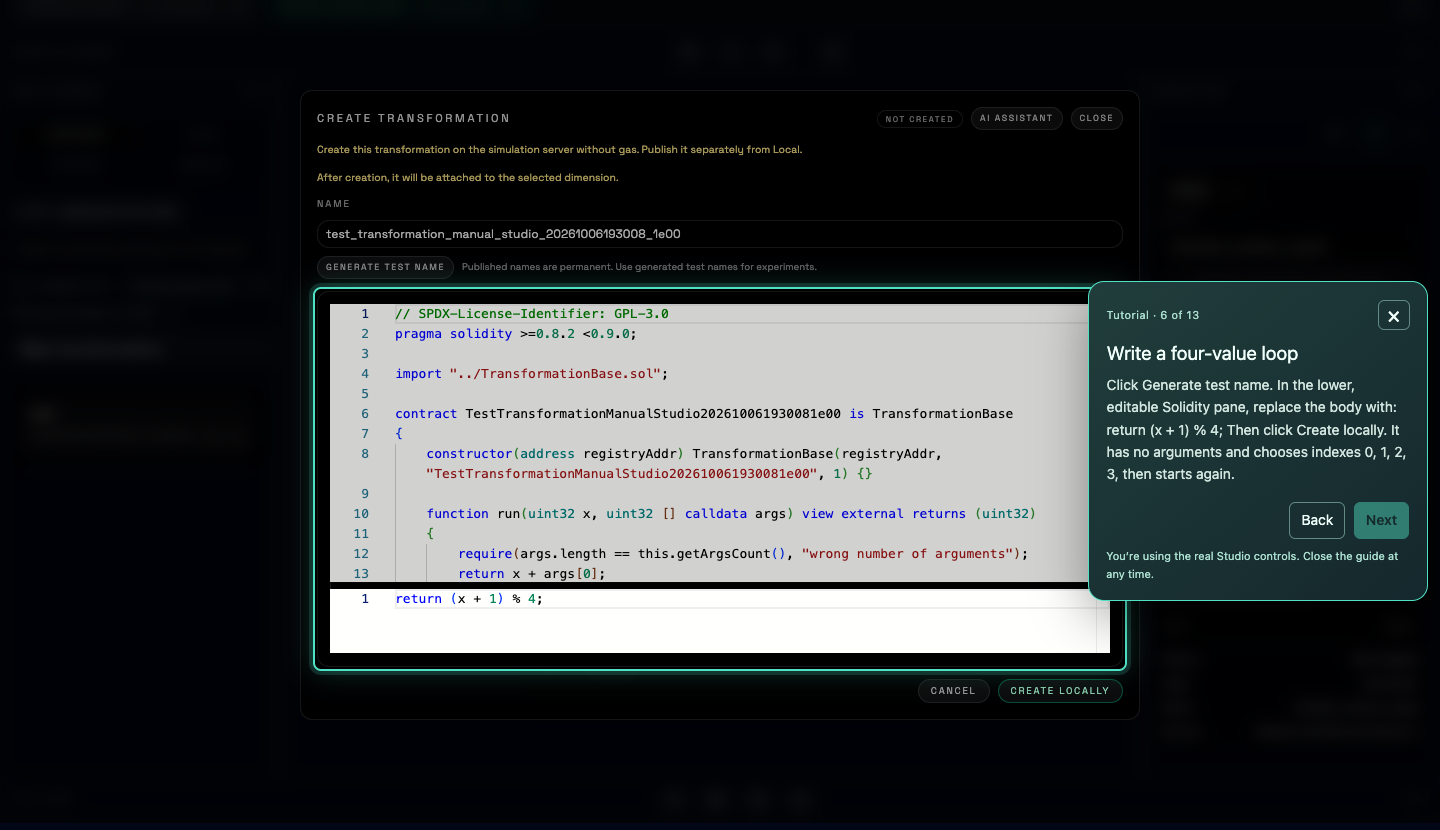
Create Solidity snippets, attach them to a connector and test six values.
Try the failing condition after the guided run
Saving a connector fixes its definition. To try different arguments, make a second connector and reuse the transformation and condition you just saved. Keep their generated names handy.
- Open a new connector tab and give its root a new, unique name.
- Add published
pitchto the flow and connect the root’s D1 outlet to pitch’s inlet, just as in the guided exercise. - In Local → Transformations, drag your saved loop onto the root’s D1 row. Select the root, find your threshold in Local → Conditions, and click Add to flow.
- In the root’s Inspector, set Condition arguments → Args to
8, 10. Select referenced pitch, set Start to 60 and keep Shift at 0. Click its Open running-instance control to switch it to Static. - In Run + Publish, set N to 6, click Create locally, then Simulate.
This time the run should be rejected: 8 is below 10. A failed condition stops the whole run;
it does not return a smaller set of notes. Your first saved connector still uses 12, 10.
Check your result: with 12, 10, the pitch stream should contain 60, 61, 62, 63, 60, 61. The condition checks the fixed arguments before the connector
produces its values. The transformation then repeats indexes 0–3, selecting those values from
pitch’s stream beginning at 60.
Keep the experiment, or make it reusable on the network
Keep the source snippets alongside your saved names. Inspection endpoints return argument counts and runtime bytecode when available; they do not return Solidity source.
You have created local simulation elements. To make the connector available on the blockchain,
publish its custom transformation and condition before publishing the connector that refers to
them. Follow the publication exercise for each
element, using the appropriate kind (transformation, condition, then connector). Each publication is a separate transaction with gas fees.
For the complete function signatures and request fields, see SDK concepts and the API reference.
Try a loop that chooses the first four values of pitch, then starts again. Add a
threshold condition: it allows the run when the supplied value is at least 10. These are two
reusable elements; the connector chooses their arguments and how to combine them.
The two Solidity snippets used in this exercise
The platform accepts a function body in sol_src and builds the contract
around it. Paste the body, without a full contract, imports or Markdown fences.
return (x + 1) % 4;x is the current unsigned 32-bit value. The remainder operator % makes 3 lead back to 0. Starting at 0, the selection indexes are 0, 1, 2, 3, 0, 1.
return args[0] >= args[1];A condition receives signed 32-bit args and returns true or false. Using args[1] makes this condition require two arguments. Here they
are fixed inputs from the connector: the supplied value and its minimum. This code does not read the
generated notes, an account balance or a sensor.
Build and check the example with your agent
Use the MCP setup and locally configured owner account from your earlier draft exercise. Ask the agent to show you both the code and its actual test results.
Read the decentralised.art documentation and inspect existing transformations and conditions before creating anything. For this tutorial exercise, create local elements under unique generated names: a transformation with Solidity function body `return (x + 1) % 4;` and a condition with body `return args[0] >= args[1];`. They require 0 and 2 arguments respectively. Make two local connectors referencing published pitch and the new transformation, fixing referenced pitch at Start 60, Shift 0 (static_ri position 2). Attach the new condition with fixed arguments [12,10] to one connector and [8,10] to the other. Simulate six values. The passing run should return 60,61,62,63,60,61; the other should reject the whole run because its condition fails. Report actual results and distinguish a failed condition from authentication or compilation errors. Keep all names and source snippets. Use my locally configured owner account; do not publish, send cryptocurrency or request my private key in chat.
Check your result: with 12, 10, the pitch stream should contain 60, 61, 62, 63, 60, 61. The condition checks the fixed arguments before the connector
produces its values. The transformation then repeats indexes 0–3, selecting those values from
pitch’s stream beginning at 60.
Keep the experiment, or make it reusable on the network
Keep the source snippets alongside your saved names. Inspection endpoints return argument counts and runtime bytecode when available; they do not return Solidity source.
You have created local simulation elements. To make the connector available on the blockchain,
publish its custom transformation and condition before publishing the connector that refers to
them. Follow the publication exercise for each
element, using the appropriate kind (transformation, condition, then connector). Each publication is a separate transaction with gas fees.
For the complete function signatures and request fields, see SDK concepts and the API reference.
Try a loop that chooses the first four values of pitch, then starts again. Add a
threshold condition: it allows the run when the supplied value is at least 10. These are two
reusable elements; the connector chooses their arguments and how to combine them.
The two Solidity snippets used in this exercise
The platform accepts a function body in sol_src and builds the contract
around it. Paste the body, without a full contract, imports or Markdown fences.
return (x + 1) % 4;x is the current unsigned 32-bit value. The remainder operator % makes 3 lead back to 0. Starting at 0, the selection indexes are 0, 1, 2, 3, 0, 1.
return args[0] >= args[1];A condition receives signed 32-bit args and returns true or false. Using args[1] makes this condition require two arguments. Here they
are fixed inputs from the connector: the supplied value and its minimum. This code does not read the
generated notes, an account balance or a sensor.
Create local elements with API calls
Use Bash and your owner’s DCN_TOKEN from the draft exercise. Sign in again if the Chain
API token has expired. Keep the same terminal open for all three steps.
DCN_API="https://api.decentralised.art/chain"
DCN_CUSTOM_ID="$(date +%s)_$RANDOM"
DCN_CYCLE="tutorial_cycle_$DCN_CUSTOM_ID"
DCN_THRESHOLD="tutorial_threshold_$DCN_CUSTOM_ID"
DCN_ALLOWED="tutorial_allowed_$DCN_CUSTOM_ID"
DCN_BLOCKED="tutorial_blocked_$DCN_CUSTOM_ID"

curl --silent --show-error --fail-with-body "$DCN_API/transformation" \
  -H "Authorization: Bearer ${DCN_TOKEN:?Sign in first}" \
  -H 'Content-Type: application/json' \
  --data @- <<JSON
{"name":"$DCN_CYCLE","sol_src":"return (x + 1) % 4;"}
JSON

curl --silent --show-error --fail-with-body "$DCN_API/condition" \
  -H "Authorization: Bearer ${DCN_TOKEN:?Sign in first}" \
  -H 'Content-Type: application/json' \
  --data @- <<JSON
{"name":"$DCN_THRESHOLD","sol_src":"return args[0] >= args[1];"}
JSON
Check that both requests succeed before continuing. Each returns its name and local address 0x0. A compilation error means the element was not created; a name conflict needs a
fresh name.
curl --silent --show-error --fail-with-body "$DCN_API/connector" \
  -H "Authorization: Bearer ${DCN_TOKEN:?Sign in first}" \
  -H 'Content-Type: application/json' \
  --data @- <<JSON
{
  "name": "$DCN_ALLOWED",
  "condition_name": "$DCN_THRESHOLD",
  "condition_args": [12, 10],
  "dimensions": [{
    "composite": "pitch",
    "transformations": [{"name": "$DCN_CYCLE", "args": []}]
  }],
  "static_ri": {
    "2": {"start_point": 60, "transformation_shift": 0}
  }
}
JSON

curl --silent --show-error --fail-with-body "$DCN_API/simulate" \
  -H 'Content-Type: application/json' \
  --data @- <<JSON
{"connector_name":"$DCN_ALLOWED","particles_count":6}
JSON
3. Create a second connector whose condition fails
The only change to the rule is its first condition argument: 8 instead of 12. The new name keeps the passing draft available.
curl --silent --show-error --fail-with-body "$DCN_API/connector" \
  -H "Authorization: Bearer ${DCN_TOKEN:?Sign in first}" \
  -H 'Content-Type: application/json' \
  --data @- <<JSON
{
  "name": "$DCN_BLOCKED",
  "condition_name": "$DCN_THRESHOLD",
  "condition_args": [8, 10],
  "dimensions": [{
    "composite": "pitch",
    "transformations": [{"name": "$DCN_CYCLE", "args": []}]
  }],
  "static_ri": {
    "2": {"start_point": 60, "transformation_shift": 0}
  }
}
JSON

curl --silent --show-error --fail-with-body "$DCN_API/simulate" \
  -H 'Content-Type: application/json' \
  --data @- <<JSON
{"connector_name":"$DCN_BLOCKED","particles_count":6}
JSON
Creation should succeed; simulation should return an error because the condition is not met. An authentication or missing-element error is a setup problem, not a successful test of the condition.
Check your result: with 12, 10, the pitch stream should contain 60, 61, 62, 63, 60, 61. The condition checks the fixed arguments before the connector
produces its values. The transformation then repeats indexes 0–3, selecting those values from
pitch’s stream beginning at 60.
Keep the experiment, or make it reusable on the network
Keep the source snippets alongside your saved names. Inspection endpoints return argument counts and runtime bytecode when available; they do not return Solidity source.
You have created local simulation elements. To make the connector available on the blockchain,
publish its custom transformation and condition before publishing the connector that refers to
them. Follow the publication exercise for each
element, using the appropriate kind (transformation, condition, then connector). Each publication is a separate transaction with gas fees.
For the complete function signatures and request fields, see SDK concepts and the API reference.
Try a loop that chooses the first four values of pitch, then starts again. Add a
threshold condition: it allows the run when the supplied value is at least 10. These are two
reusable elements; the connector chooses their arguments and how to combine them.
The two Solidity snippets used in this exercise
The platform accepts a function body in sol_src and builds the contract
around it. Paste the body, without a full contract, imports or Markdown fences.
return (x + 1) % 4;x is the current unsigned 32-bit value. The remainder operator % makes 3 lead back to 0. Starting at 0, the selection indexes are 0, 1, 2, 3, 0, 1.
return args[0] >= args[1];A condition receives signed 32-bit args and returns true or false. Using args[1] makes this condition require two arguments. Here they
are fixed inputs from the connector: the supplied value and its minimum. This code does not read the
generated notes, an account balance or a sensor.
Create and test the elements in your code
In your SDK project, save this as custom-elements.mjs or custom-elements.py. Use the owner key already configured locally in DCN_OWNER_KEY. Run node custom-elements.mjs or python custom-elements.py. The script saves local drafts and simulates them; it
sends no blockchain transaction.
import { randomUUID } from "node:crypto";
import { Wallet } from "ethers";
import { DecentralisedArtClient, DecentralisedArtApiError } from "decentralised-art";

const sdk = new DecentralisedArtClient({ baseUrl: "https://api.decentralised.art/chain" });
const wallet = new Wallet(process.env.DCN_OWNER_KEY);
await sdk.loginWithWallet(wallet);

const id = randomUUID().replaceAll("-", "");
const cycle = "tutorial_cycle_" + id;
const threshold = "tutorial_threshold_" + id;
const allowed = "tutorial_allowed_" + id;
const blocked = "tutorial_blocked_" + id;

console.log(await sdk.transformationPost({
  name: cycle, sol_src: "return (x + 1) % 4;",
}));
console.log(await sdk.conditionPost({
  name: threshold, sol_src: "return args[0] >= args[1];",
}));

for (const [name, value] of [[allowed, 12], [blocked, 8]]) {
  const draft = await sdk.connectorPost({
    name,
    condition_name: threshold,
    condition_args: [value, 10],
    dimensions: [{
      composite: "pitch",
      transformations: [{ name: cycle, args: [] }],
    }],
    static_ri: {
      "2": { start_point: 60, transformation_shift: 0 },
    },
  });
  console.log("Draft:", draft.name, "Address:", draft.address);
}

const streams = await sdk.simulate(allowed, 6);
for (const stream of streams) console.log(stream.path, stream.data);
const pitch = streams.find((stream) => stream.path.endsWith("/pitch:0"));
if (JSON.stringify(pitch?.data) !== JSON.stringify([60, 61, 62, 63, 60, 61])) {
  throw new Error("Unexpected pitch values; check the connector and its running instances.");
}
console.log("Cycle arguments:", (await sdk.transformationGet(cycle)).args_count);
console.log("Threshold arguments:", (await sdk.conditionGet(threshold)).args_count);

try {
  await sdk.simulate(blocked, 6);
  throw new Error("Unexpected success: the threshold should reject this run.");
} catch (error) {
  if (!(error instanceof DecentralisedArtApiError)) throw error;
  console.log("Rejected run; inspect the API error:", error.status, error.body);
}
import os
from uuid import uuid4
from eth_account import Account
from decentralised_art import Client
from decentralised_art.client import DecentralisedArtApiError
account = Account.from_key(os.environ["DCN_OWNER_KEY"])
with Client(base_url="https://api.decentralised.art/chain") as sdk:
sdk.login_with_account(account)
suffix = uuid4().hex
cycle = "tutorial_cycle_" + suffix
threshold = "tutorial_threshold_" + suffix
allowed = "tutorial_allowed_" + suffix
blocked = "tutorial_blocked_" + suffix
print(sdk.transformation_post({
"name": cycle, "sol_src": "return (x + 1) % 4;",
}))
print(sdk.condition_post({
"name": threshold, "sol_src": "return args[0] >= args[1];",
}))
for name, value in [(allowed, 12), (blocked, 8)]:
draft = sdk.connector_post({
"name": name,
"condition_name": threshold,
"condition_args": [value, 10],
"dimensions": [{
"composite": "pitch",
"transformations": [{"name": cycle, "args": []}],
}],
"static_ri": {
"2": {"start_point": 60, "transformation_shift": 0},
},
})
print("Draft:", draft.name, "Address:", draft.address)
streams = sdk.simulate(allowed, 6)
for stream in streams:
print(stream.path, stream.data)
pitch = next((s for s in streams if s.path.endswith("/pitch:0")), None)
if pitch is None or pitch.data != [60, 61, 62, 63, 60, 61]:
raise RuntimeError("Unexpected pitch values; check the connector and its running instances.")
print("Cycle arguments:", sdk.transformation_get(cycle).args_count)
print("Threshold arguments:", sdk.condition_get(threshold).args_count)
try:
sdk.simulate(blocked, 6)
except DecentralisedArtApiError as error:
print("Rejected run; inspect the API error:", error.status_code, error.body)
else:
raise RuntimeError("Unexpected success: the threshold should reject this run.")Check your result: with 12, 10, the pitch stream should contain 60, 61, 62, 63, 60, 61. The condition checks the fixed arguments before the connector
produces its values. The transformation then repeats indexes 0–3, selecting those values from
pitch’s stream beginning at 60.
Keep the experiment, or make it reusable on the network
Keep the source snippets alongside your saved names. Inspection endpoints return argument counts and runtime bytecode when available; they do not return Solidity source.
You have created local simulation elements. To make the connector available on the blockchain,
publish its custom transformation and condition before publishing the connector that refers to
them. Follow the publication exercise for each
element, using the appropriate kind (transformation, condition, then connector). Each publication is a separate transaction with gas fees.
For the complete function signatures and request fields, see SDK concepts and the API reference.
Reuse your new rules too. Other connectors can use these elements by name. To make them available on the network, publish the transformation and condition before the connector that references them, following the publication step. Publication is permanent and costs gas.
Practise on Sepolia. What changes on Mainnet?
The platform currently uses Sepolia, an Ethereum test network. Published elements are real smart contracts, but payments and gas use test ETH intended for experimentation. This is where you can try your rules and economic ideas before putting funds with real value at stake.
Sepolia
- Chain ID
- 11155111
- Funds
- Test ETH from a faucet
- Gas and payments
- Use test funds
- Your elements
- Published on Sepolia
Ethereum Mainnet
- Chain ID
- 1
- Funds
- ETH with real monetary value
- Gas and payments
- Spend real funds
- Your elements
- Need a Mainnet deployment
The ideas stay the same: create rules, combine them in connectors, and let Worlds interpret the results. The chain state changes. Sepolia balances, contracts, payment receipts and oracle data do not automatically move to Mainnet. The platform and its dependencies need production deployments, and contributions need to reference elements on that network.
For this tutorial, keep using Sepolia. Studio’s publication flow and our signing examples expect it. Changing your wallet to Mainnet alone does not migrate the platform. A future Mainnet release will need its own endpoints, contract configuration and migration instructions. See Ethereum’s network guide for the difference between test networks and Mainnet.
How makers shape an economy
A connector’s creator chooses whether to attach a condition. They can share it without a payment requirement, or require a recorded payment before it runs. A World’s creator chooses which connectors and formats the World accepts, and how their values become something you can see, hear or use. Accepting a connector does not change the conditions its creator attached.
Explore two ways a connector creator can make the same values available.
A person, World or agent
Anyone can request its values.
Its creator chooses the connectors and formats it supports, and how to show, play or use their values.
Reading or simulating the connector needs no blockchain gas fee. Publishing it requires gas.
This connector has no condition. If it uses another connector, that connector’s conditions still apply.
An economy can grow from these choices across the network. Some makers might offer freely shared materials; others might ask for contributions to their work. Custom payment contracts could divide a payment between collaborators. A connector that references someone else’s connector must still satisfy that connector’s condition. Payment rules do not make public blockchain data private, and payments or royalty splits need their own implementation.
What is free, and what costs gas?
Gas is Ethereum’s fee for processing a blockchain transaction. It is separate from any payment a maker chooses to require. A connector with no financial condition can be free to run even though publishing it cost its maker gas.
| Action | Blockchain gas fee? |
|---|---|
| Browse definitions and read published elements | No |
| Sign in, create local drafts and simulate | No |
| Execute on the Network through this platform’s read API | No — it reads a recorded block without sending a transaction |
| Publish a transformation, condition or connector | Yes — the publishing account pays gas |
| Send a payment or update a payment receipt on chain | Yes — plus the payment amount, if any |
| Request or record an oracle update on chain | Yes — the integration may also charge a service fee |
A read-only run evaluates transformations and conditions without spending the reader’s ETH. If you build another contract that calls them inside a blockchain transaction, that transaction does use gas. The same distinction applies on Sepolia and Mainnet; the funds used to pay differ. Hosting, external services and an AI agent’s own charges are separate from these blockchain fees. Ethereum’s gas guide explains how transaction fees work.
Help people understand what they’re using: identify which connectors require a payment, which address receives it, and what that payment permits. If you build a World, explain the requirements of the connectors it accepts.